



College football is a big deal. For fans of teams like UF football, every game is a major event. But showing these exciting games to people all over the world is a much bigger job than most realize. It’s not just about turning on a camera. For big companies, broadcasting games like the UF football schedule or even the fsu football schedule means facing many hard business and technical challenges.
Imagine trying to send a live picture of a game perfectly clear to millions of screens, from someone watching on a big TV in New York to a fan streaming on a phone in Tokyo.
This needs very careful planning. Companies must ensure the broadcast quality stays high, no matter where the viewer is or what device they are using. This includes making sure the video starts quickly and doesn’t stop to load, which experts call "rebuffering" Observability in Live Broadcasts and Quality of Experience.
Getting everything right for a global audience, whether for the texas football schedule or any other big game, is a huge task. It means managing many technical details, making sure they have the right to show the game, and keeping costs in check. They also need to make sure the stream is always working and that everyone has a good experience. Sometimes, this involves using services like a marquee sports network live stream.
This guide is for the important people in charge at these big companies. It will help you understand all the tough parts of broadcasting college football. We will look at how to pick the right technical tools, figure out who has the right to show the games, plan for costs, and use the best ways to keep the quality very high. Our goal is to give you clear, useful information so you can make smart choices. You’ll learn how to bring exciting college football action to fans everywhere, without a hitch, and how we help with optimizing college football broadcasting for sports enterprises.
To get a deeper look at our services and how we help major organizations broadcast live sports globally, you can Learn More About TPT Global.
The previous section talked about the difficulties of sending live college football games to fans everywhere. Now, let’s break down exactly what it takes to broadcast big games like a uf football match. It’s more than just putting a camera in the stadium.
Broadcasting Requirements for College Team Football: Scope, Stakeholders, and KPIs
First, we need to understand the scope of a college football broadcast. This covers several key parts:
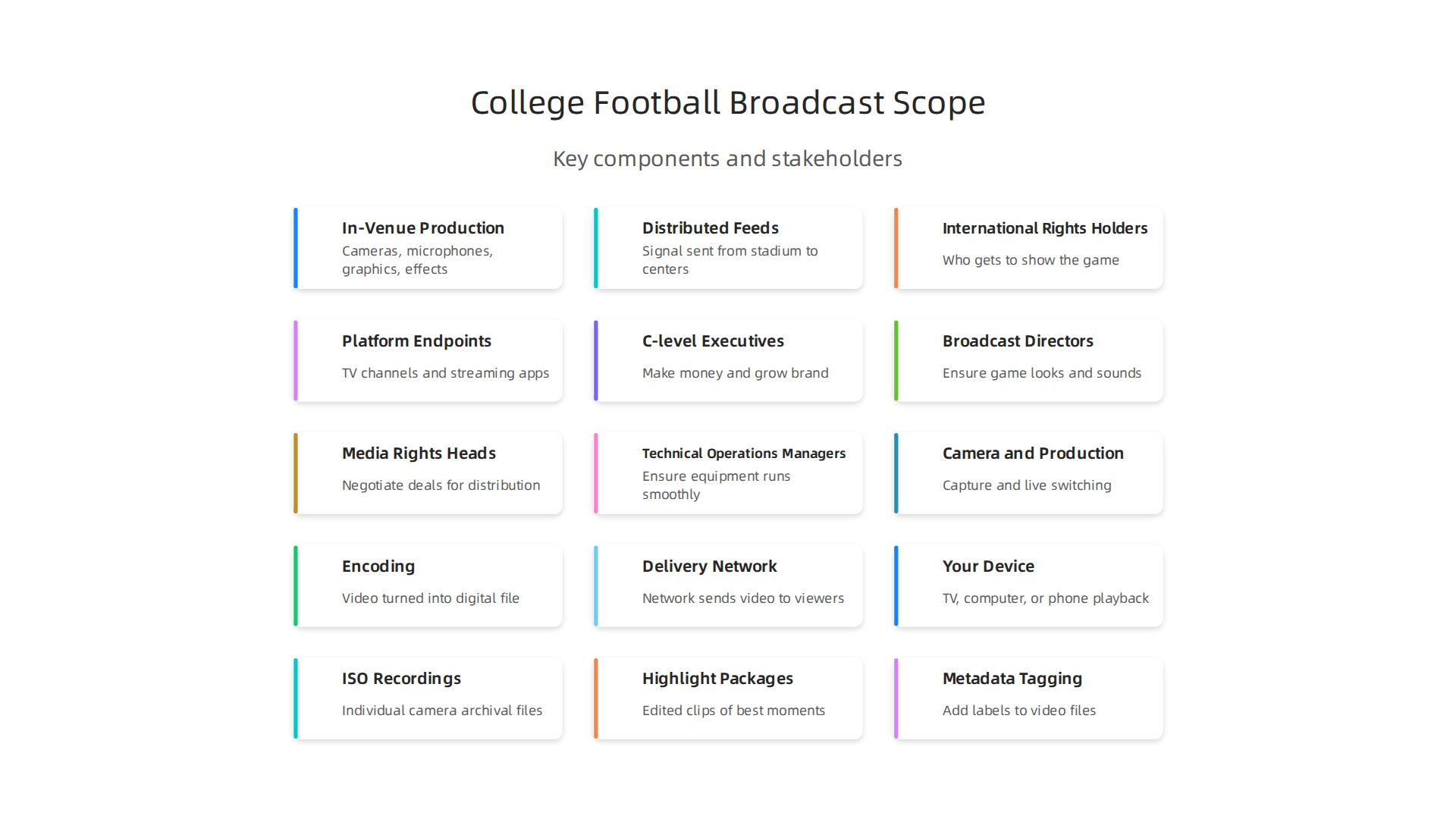
- In-Venue Production: This is what happens right at the stadium. It includes all the cameras, microphones, special effects, and graphics needed to capture the game. Think about the team working inside the production truck.
- Distributed Feeds: Once the game is captured, the signal needs to be sent out from the stadium to different places. This involves complex networks that carry the video and audio to various broadcast centers around the world.
- International Rights Holders: Who gets to show the game? This is a big question. College sports conferences usually own the rights to broadcast their teams’ games, like the fsu football schedule or the texas football schedule. They then sell these rights to TV networks and streaming services. For example, sports media rights are licensed to broadcast games in exchange for money, often by conferences or the NCAA itself College Sports Media Rights.
In 2026, global spending on sports rights reached over $67 billion Global sports rights climb to over $67 billion in 2026.
- Platform Endpoints: Where do fans watch? This means traditional TV channels, streaming apps, and specific sports networks, such as a marquee sports network live stream. Broadcasts might go to networks like ESPN, CBS, or NBC Sports, and also to streaming services like ESPN+ or Paramount+ Atlantic 10 Announces Media Rights Agreements.
Next, let’s look at the key people involved, or stakeholders:
- C-level Executives: These are the top bosses, like CEOs and marketing chiefs. They care about how the broadcast helps the company make money and grow its brand.
- Broadcast Directors: They make sure the game looks good and sounds great. They handle the creative and technical side of the show.
- Heads of Media Rights: These people make the deals for showing the games. They decide which companies can broadcast which games and for how much. They are key to making sure the right content is shown in the right places. To learn how to streamline global live sports production for major rights holders, explore our insights.
- Technical Operations Managers: They are the ones who make sure all the equipment works perfectly, from cameras to internet connections, so the broadcast runs smoothly.
Finally, we have Key Performance Indicators (KPIs). These are the ways companies measure if a broadcast is successful:
- Reach: How many people actually watch the game? The more eyes on the screen, the better.
- Latency: This is how long it takes for the live action to appear on your screen after it happens in real life. Less delay is always better.
- Uptime: Was the broadcast on without any interruptions? No one wants a frozen screen during a big play.
- Viewer Experience: Did fans enjoy watching? This covers everything from video quality to sound and ease of access. We help companies deliver flawless global live sports broadcasts for maximum fan engagement.
Understanding these parts is vital for any big company looking to broadcast college football successfully.

If you’re ready to discuss your next big broadcast project, we’re here to help.
Request a Broadcast Consultation
For a broadcast to have great uptime and viewer experience, as we just talked about, the technical setup at the stadium must be top-notch. This includes everything from cameras to the internet connections.
Technical Infrastructure: Cameras, RF, OB Trucks, and On-Site Networking
First, let’s look at cameras and how they are placed. To show a college football game well, you need many cameras. For a basic TV broadcast, you’d typically see at least four to five cameras. These cameras are placed in key spots, like high up at the 50-yard line, down at the end zones, and sometimes on the field itself to get different views of the game. For big games, like a major uf football match, ESPN might use over 50 cameras, or even more than 100 for very special events, to capture every detail from all angles. This helps capture the excitement of teams like those on the texas football schedule.
Then there’s RF (Radio Frequency) planning. This is all about wireless technology. Think of wireless microphones for coaches or sideline reporters, and even wireless cameras that move around the field. All these devices use radio waves. It’s super important to plan out which frequencies each device uses so they don’t block each other or cause problems with the broadcast. Avoiding interference makes sure everything sounds and looks clear, which is key for a smooth marquee sports network live stream.
When it comes to the "control room" for a live broadcast, there are two main choices: OB (Outside Broadcast) trucks or flypacks.
- OB Trucks: These are like huge mobile TV studios on wheels. They come packed with all the cameras, sound mixers, video switchers, and graphic machines needed for a big show. They are best for large, complex games, offering a complete and powerful production hub right at the stadium. They’re often used for major college games, including important matchups on the fsu football schedule.
- Flypacks: These are smaller, more portable versions. They are sets of equipment packed into cases that can be shipped or flown to a location. Flypacks are great for smaller productions or when space is tight, offering flexibility for broadcasts where a full OB truck isn’t practical or needed.
Finally, we need strong on-site networking. This is the backbone that connects everything. Imagine all those cameras, microphones, and other devices needing to send their signals to the OB truck or flypack. This needs a very fast and reliable network inside the stadium. In 2026, many big productions use IP (Internet Protocol) networks, often with fiber optic cables, to carry all this video and audio data. This allows different production trucks to share feeds and resources easily, creating a single, big production space even across multiple vehicles CFP National Championship 2026: Game Creek Video Fields Premiere IP Compound for ESPN Game, Studio Coverage.
For enterprise-level reliability, these networks always have backups, called redundancy patterns. This means if one cable or piece of equipment fails, there’s another ready to take over instantly, so fans never miss a second of the game. Making sure all these technical parts work together is a big job. To learn more about getting broadcasts ready for the biggest stages, check out our guide on optimizing college football broadcasting for sports enterprises.
Understanding these technical details helps ensure a seamless, high-quality broadcast for any college football event.
If you’re looking for advanced solutions in live sports production, you’ll want to take a closer look at what goes into making these broadcasts shine. Explore Our Broadcast Services
When all the cameras, microphones, and other gear are set up, the next big step is putting everything together into one smooth broadcast. This is the live production workflow, where many parts come together to show a game, like those on the texas football schedule, to viewers.
Multicam Coverage: From Many Cameras to One Stream
First, think about all those camera feeds. You might have ten cameras, or even over a hundred for a major event like ESPN’s MegaCast Inside ESPN’s MegaCast: 100+ Cameras and Endless Options. A team in the OB truck or flypack uses a special device called a production switcher. This switcher lets the director pick which camera view to show at any moment. They switch between wide shots of the field, close-ups of players, and views from different angles to follow the action. This helps make sure you don’t miss any play.
Replay and Graphics: Adding Excitement and Information
As the game plays out, exciting moments need to be shown again. This is where replay systems, like EVS (short for instant video server), come in. Replay operators quickly find key plays, slow them down, and show them from different camera angles. These replays help viewers understand what happened and relive the best parts of the game. For example, during the CFP National Championship in 2026, production used Evertz DreamCatcher for replays, along with a Ross Acuity production switcher and Ross XPression for graphics CFP National Championship 2026: Van Wagner Relies on ….
Then there are graphics. These are the on-screen scores, player names, team stats, and other information that pop up during the game. Graphics make the marquee sports network live stream much easier to follow. They tell you who scored, how much time is left, and key stats about the players. This also includes the official game clock and score, which must be perfectly accurate and updated in real-time. Making sure fans get accurate, real-time sports scores greatly increases their enjoyment. You can learn more about how to maximize fan engagement with flawless real-time sports scores.
The Team Behind the Scenes: Staffing and Coordination
Putting all this together takes a skilled team.
- Production Director: This person is like the conductor of an orchestra, telling camera operators, replay staff, and graphics teams what to do and when.
- Replay Operators: They are fast thinkers, finding and showing replays quickly.
- Graphics Operators: These folks manage all the on-screen text and animations.
- Audio Mixers: They make sure all the sounds, from the crowd to the commentators, sound just right.
For big games, different companies often work together. One company might handle cameras, another replays, and another graphics. Making sure all these vendors and their teams work as one smooth unit is a huge job for enterprise-level sports broadcasting. Their goal is always to deliver a flawless, exciting broadcast.
Seeing how all these elements come together is truly impressive. If you are interested in seeing professional live sports production in action, you can Watch Our Latest Broadcast Work.
The entire live production workflow, from the first camera shot to the final on-screen graphic, is a complex dance.
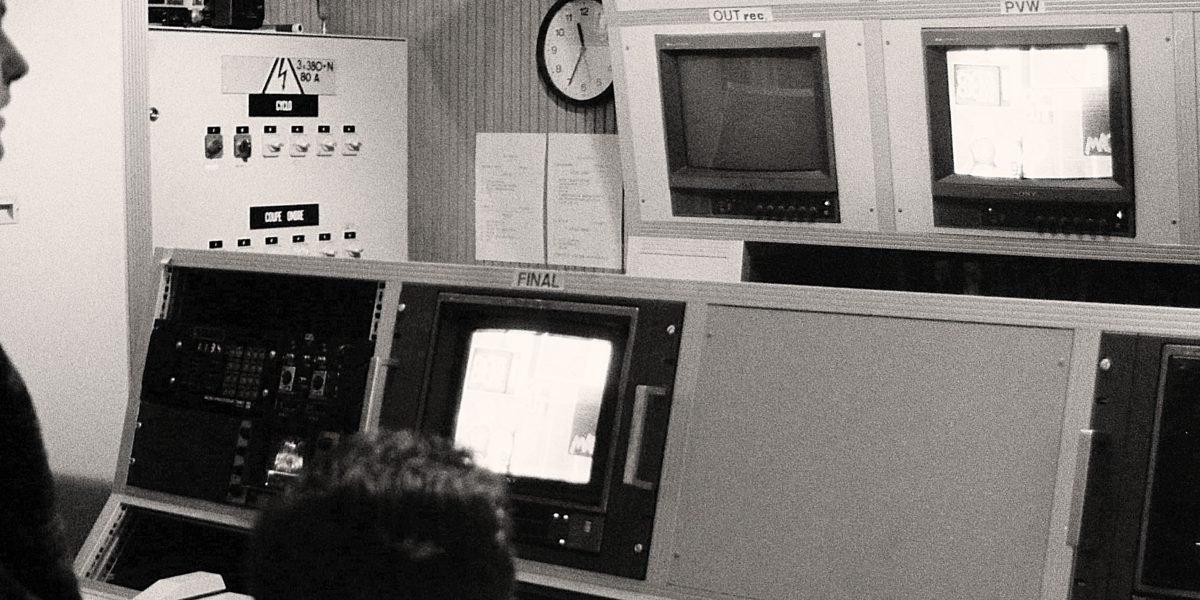
It takes careful planning, top-notch equipment, and a skilled team to make sure every college football game reaches fans with the highest quality possible.
To explore how these advanced production workflows can benefit your next major sports event, consider speaking with an expert. Request a Broadcast Consultation
After a game is made, it needs to be sent out to people watching all over the world. This is where getting the video from the stadium to your screen comes in. It’s about how fast and clearly that uf football game, or any other big sports event, travels through many steps to reach you.
Latency, Encoding, and Streaming Delivery for Global Audiences
One big idea in sending video is "latency." This is just a fancy word for delay. It’s the little bit of time it takes for something to happen live and for you to see it on your screen. You want this delay to be as small as possible so you don’t see a score update on your phone before you see the play on TV.
Where Does the Delay Come From?
Video doesn’t just jump from the camera to your TV. It goes through many steps, and each step adds a tiny bit of delay.
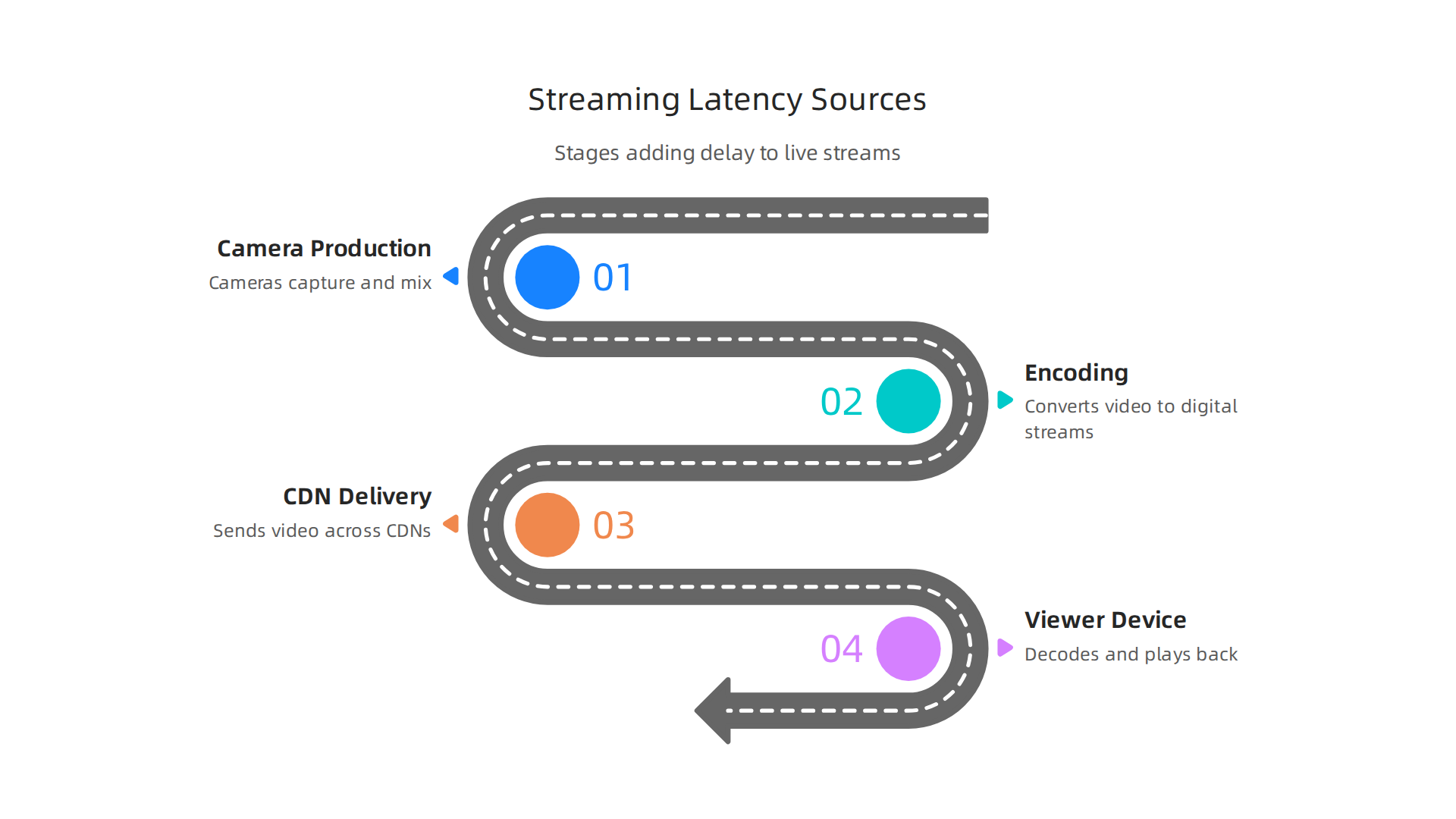
- Camera and Production: First, the cameras capture the action, and the production team puts it all together. This takes a tiny bit of time.
- Encoding: Next, the video needs to be turned into a digital file that can travel over the internet. This process is called encoding. Think of it like packing a big box of toys into smaller, easier-to-carry bags. This packing takes a moment.
- Delivery Network (CDN): Then, the video travels through a big network of computers called a Content Delivery Network, or CDN. This network helps send the video to many people quickly, no matter where they are. But even with fast networks, it still takes time for the video to reach your home.
- Your Device: Finally, your TV, computer, or phone has to get the video and show it to you. This also adds a small delay.
How Much Delay Is Okay?
The amount of delay that’s okay depends on what you’re watching and how.
- Live TV vs. Streaming: For regular TV, a delay of 15 to 30 seconds used to be common, as it was sent in big chunks Streaming Protocols for Live Broadcasting (2026). But for streaming on your phone, people want it much faster.
- Sports: For live sports, like a crucial play during the
fsu football schedule, a short delay is super important. If the delay is too long, you might hear your friend cheer or see a social media update about a touchdown before it happens on your screen. - Real-Time vs. Low Latency:
- Real-Time (under 0.5 seconds): This is super fast, almost like talking face-to-face. It’s used for things like video calls or online auctions where every millisecond counts Low Latency Live Streaming: The 2026 Edge Playbook – Fora Soft.
- Low Latency (2-5 seconds): This is what most sports broadcasts aim for in 2026. It’s fast enough that you won’t likely get spoilers from social media. Methods like LL-HLS and LL-DASH over CMAF help achieve this speed at a large scale Achieving Sub-Second Latency for Sports Streams – CDN Blog.
Sending Video to the World
To send a game like one from the texas football schedule to fans everywhere, broadcasters use special ways to encode and deliver the video.
- Encoding Options: Video needs to be "packed" in a smart way so it looks good but doesn’t take too much internet speed. Newer ways to encode, like H.265 (HEVC), make video files smaller while keeping them clear.
- Low-Latency Protocols: These are like special rules for sending video that help reduce delay. WebRTC, LL-HLS, and LL-DASH are some of the most popular protocols used in 2026 to get video to you fast Low-Latency Streaming Protocols: WebRTC vs LL-HLS vs CMAF ….
- CDNs and Edge Strategies: To reach many people far away, companies use CDNs with "edge servers." Think of these as many mini-warehouses for video files spread out all over the world. When you want to watch a
marquee sports network live stream, the video comes from the closest warehouse, making it faster to get to you. This is how large enterprises scale their broadcasts internationally.
Making sure the video gets to fans around the world quickly and clearly is a big job. It needs the right technology and smart planning. If you want to dive deeper into making broadcasts smooth and wide-reaching, you can explore our full range of services.
To learn more about broadcasting to fans around the world, including specific strategies for collegiate sports, you can check out how to maximize global reach with collegiate football broadcast schedules and team coverage.
Bringing all these pieces together ensures that no matter where fans are, they get to experience the excitement of the game with the best possible quality and the least amount of delay.
If you’re interested in making sure your next event reaches its global audience with top-notch delivery, we’re here to help. Explore Our Broadcast Services
Rights, Distribution Platforms, and OTT Strategies for College Football
Beyond just getting the video from the stadium to your screen, there’s a whole world of rules and deals that decide who gets to show a game and how you can watch it. This is called "media rights" and it’s a big part of how college football reaches fans.
Who Owns the Rights to the Game?
Think of media rights as the permission slip to broadcast a game. In college sports, these permissions are usually owned by the big conferences or the NCAA itself, not always by individual schools. For example, a conference will often make a deal for all its member schools to show their games College Sports Media Rights: TV Deals, Streaming, and …. So, if you want to watch a uf football game, the broadcast rights for that game might be part of a bigger deal made by its conference.
These deals can be for "national rights," meaning anyone in the country can watch, or "regional rights," where only people in certain areas can tune in. In 2026, many big conferences have long-term deals with traditional TV networks Consolidated College Football Media Rights Analysis. The NCAA itself also signs agreements with major broadcasters for its championships ESPN and NCAA Reach New, Eight-Year Media Rights Agreement.
How Do You Watch the Games?
Once the rights are sorted, the next step is getting the games to you. There are a few main ways:
- Linear TV: This is your regular cable or broadcast TV. Many college football games, especially the big ones, are still shown here. You might catch a game from the
fsu football scheduleon a major network. - OTT Streaming: OTT stands for "Over-The-Top," and it just means video that comes straight to your device over the internet, without needing a traditional cable TV package. Services like ESPN+ or Peacock are popular OTT platforms. Smaller conferences also use these, sometimes even creating their own streaming channels Summit League unveils an expansion of media rights through agreements with CBS Sports and Midco.
- Social Platforms: Some highlights or even parts of games might be shown on social media apps, especially for a younger audience.
Many broadcasters now use a mix of these. For instance, a game could be on a traditional TV channel and also streamed online, reaching a wider audience. To really get games to fans everywhere, especially for a global audience, broadcasters need to pick the best live TV channels and streaming platforms.
How Do They Make Money from Games?
Broadcasters use different ways to earn money from showing games:
- Subscription: You pay a fee to watch, like for a streaming service or a special sports package. This is common for exclusive content, such as certain
marquee sports network live streamevents. - Ad-Supported: The games are free to watch, but you see commercials during breaks. Think of this like regular TV.
- Hybrid: A mix of both. Some games might be free with ads, while others require a subscription.
Getting Games Ready for Fans Everywhere
For a game from the texas football schedule to reach fans across the globe, it needs special planning. This involves packaging the video in ways that work for different internet speeds and devices around the world. Companies often work with experts who understand how to optimize college football broadcasting for sports enterprises to make sure every fan gets a great viewing experience, no matter where they are.
Making sure college football games are seen by as many fans as possible involves tricky rights deals, smart choices about where to show them, and technical know-how. If you’re involved in sports and media, understanding these parts is key.
If you’re looking for a partner that handles every aspect of sports and media, from rights to production, look no further than Trans Group.
Getting college football games from the field to fans around the world isn’t just about rights and platforms; it also costs a lot of money. Businesses involved in broadcasting need to carefully plan their budget and manage who they work with. Let’s look at the main costs and how to handle them better.
What Does It Cost to Broadcast a Game?
Broadcasting a game, whether it’s a uf football showdown or a major championship, involves several big cost areas:
- Media Rights Fees: This is often the biggest cost. It’s what broadcasters pay to get the permission slip to show the game. In 2026, global spending on sports rights reached over $67 billion [Global sports rights climb to over $67 billion in 2026]. Streaming services, for example, are set to spend about $14.2 billion on sports rights in 2026 alone [Streamers to spend ‘US$14.2bn’ on sports rights in 2026].
- Production Labor: This includes all the people who make the broadcast happen. Think of camera operators, directors, sound engineers, and replay experts. Their skills are key to a great broadcast.
- Equipment Rental: High-quality cameras, microphones, lighting, and special production trucks don’t come cheap. Many companies rent this gear for each game or season.
- Transmission and Encoding: After the game is filmed, the video signal needs to be sent out. This involves special technology to make sure the video gets to homes and devices clearly, no matter if it’s for a
texas football schedulegame on TV or afsu football schedulegame streaming online. - Distribution and OTT Platform Costs: If you’re streaming games, you pay to use the internet and streaming platforms. These costs can include cloud services and making sure the video can be watched on many different devices.
These costs keep going up. In fact, expenses for sports rights are growing faster than the money broadcasters make from them [Sports Rights Costs Grow Faster Than Revenue Gains].
Smart Ways to Save Money and Make Things Easier
Managing all these different costs and working with many different companies can be a headache. Imagine trying to coordinate everyone for a marquee sports network live stream event! This is where smart planning and vendor management come in.
- Consolidate Vendors: Instead of hiring a separate company for cameras, another for sound, and another for streaming, try to find one company that can do many things. This helps reduce how many people you have to talk to and makes the whole process smoother.
- Procurement Checklist: Before you sign any deals, make a list of everything you need. This helps make sure you get the best value and that all parts of the broadcast are covered. It helps control the total cost and reduces extra work.
Working with a partner that offers a complete, end-to-end solution can make a big difference. Such a partner can help [simplify your live sports production with a unified end-to-end solution] by managing all aspects from filming to broadcasting. This approach can help streamline global live sports production for major rights holders and keep your budget in check.
If you’re looking to make your broadcast operations smoother and more cost-effective, considering a single provider for your needs can be a game-changer.
Ready to discuss how to make your college football broadcasts more efficient and impactful? Request a Broadcast Consultation today.
After making smart choices about vendors and managing costs, the next big step is making sure the actual broadcast looks great and runs smoothly. This means watching everything very closely during the game and preparing everything perfectly once the game is over. For any uf football game or a big marquee sports network live stream, quality is key.
Quality Control, Monitoring, and Post-Game Deliverables
Even with the best plans, live broadcasts need constant checking. It’s like watching a chef cook; you want to make sure every step is just right. This is where monitoring comes in.
Watching the Game: Monitoring Stacks
During a live game, broadcasters use special tools, called monitoring stacks, to check many things at once. These tools help them understand two main areas:
- Quality of Experience (QoE): This looks at what the viewer sees and feels. Are they getting a clear picture? Is the video starting quickly? Is it stopping to buffer a lot? Metrics like video startup time, the percentage of time spent buffering, and how often playback fails are super important here. The goal is to make sure the viewer’s experience is excellent [Quality of Experience (QoE) in Video Streaming]. Industry experts suggest that viewers should spend less than 1% of their watching time waiting for video to load or rebuffer [Streaming Video Monitoring: The Complete Guide (2026)].
- Quality of Service (QoS): This looks at the technical side of the broadcast, like how well the network is working. It checks things such as uptime (how long the system is running), how often errors happen, the internet speed (bandwidth), and how much delay there is (latency). QoS makes sure the broadcasting network itself is performing well [QoS monitoring in OTT: importance, challenges & best].
To keep an eye on all this, teams use:
- Automated Alerts: These are like alarms that go off if something goes wrong, like if the video quality drops suddenly during an
fsu football schedulegame. - Visual Monitoring: This involves people watching the live feed on screens to catch any problems the computers might miss.
People called "live QC operators" are responsible for these checks during the game. They act fast to fix issues so viewers don’t even notice them.
They also make sure the broadcast has very low latency, meaning the action on screen happens almost at the same time as it does in real life. Some modern tools can get video from the field to your screen in less than half a second [Low Latency Streaming: Sub-Second at Scale (2026)]. Catching problems quickly is vital for a smooth broadcast, whether it’s for a local texas football schedule game or a global championship. It helps to deliver flawless global live sports broadcasts for maximum fan engagement.
After the Whistle: Post-Game Deliverables
Once the game is over, the work isn’t done. Broadcasters need to prepare several things:
- ISO Recordings: These are individual recordings from each camera used during the game. Think of them as raw footage. They are very helpful for making highlights later.
- Highlight Packages: These are exciting clips of the best moments from the game. They are often put together very quickly to be shared on social media or during news programs.
- Metadata Tagging: This means adding labels or descriptions to all the video files. For example, marking when a touchdown happened or when a specific player made a great play. This makes it much easier for rights holders and streaming platforms to search for and use specific clips later. This also helps to maximize fan engagement with flawless real-time sports scores.
These files need to be delivered in specific formats so that they can be easily used by different companies, like the networks that own the rights to the games or the streaming services that show them.
Ensuring top-notch quality during the live broadcast and managing all the post-game materials smoothly are crucial parts of delivering a professional sports experience. When these steps are handled well, fans get the best possible viewing experience.
If you’re interested in learning more about how comprehensive broadcast services can elevate your live sports events, we invite you to Explore Our Broadcast Services.
Summary
This article explains what it takes for large organizations to broadcast college football to global audiences reliably and profitably. It walks through the full lifecycle—from in-venue production and RF planning to OB trucks or flypacks, on-site networking, multicam switching, replays, and graphics—so decision makers understand the technical requirements. The guide covers distribution challenges such as low-latency encoding, CDN/edge strategies, and streaming protocols, plus the complex world of media rights, OTT choices, and monetization. It also breaks down costs (rights, labor, equipment, transmission) and shows practical ways to consolidate vendors and control budgets. Finally, it highlights monitoring for Quality of Experience and Quality of Service, live QC workflows, and post-game deliverables like ISO recordings and metadata. After reading, executives and broadcast leads will know how to plan, staff, and buy the right solutions to deliver seamless, low-latency college football broadcasts at scale.